Navigating New York City requires a reliable map to understand its boroughs, streets, and transit systems. NYC is vast, consisting of five boroughs—Manhattan, Brooklyn, Queens, The Bronx, and Staten Island—with complex neighborhoods, highways, and subways. A good map helps tourists, commuters, and residents explore efficiently.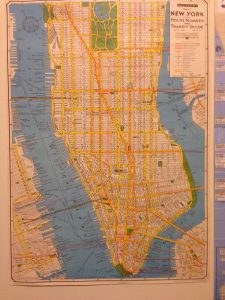
Maps of NYC are available in both digital and physical formats, offering detailed views of streets, transit lines, parks, and landmarks. Digital maps provide real-time updates, while printed maps are useful for offline navigation. Knowing where to find the best maps ensures stress-free travel throughout the city.
In this article, we will explore the best sources to find a map of New York City, including online resources, apps, and physical options, along with tips for choosing the right map for your needs.
Where Can I Find A Map Of New York City?
1. Google Maps – Best for Real-Time Navigation
Google Maps offers detailed digital maps of New York City with real-time traffic, transit, and walking directions. It covers all five boroughs and provides street-level details.
The app is available on smartphones, tablets, and desktops. Google Maps also includes landmarks, restaurants, and public transit stops.
Users can save offline maps for areas with limited internet access. It provides the fastest routes for driving, cycling, or walking. Real-time updates prevent getting lost in unfamiliar areas.
Pros:
-
Real-time navigation
-
Transit directions
-
Street-level details
-
Offline maps
-
Landmarks included
-
Available on devices
-
Free
Cons:
-
Requires internet for live updates
-
Can drain battery
-
Some minor inaccuracies
2. NYC Open Data Maps – Best for Detailed Borough Data
NYC Open Data provides official city maps covering streets, zoning, and demographic information. It is maintained by New York City government.
These maps are detailed and accurate, useful for researchers, students, and urban planners. They include GIS data for more advanced mapping needs.
Maps are available online for free download or online viewing. Users can access PDFs or interactive tools to explore neighborhoods. They provide official data that ensures accuracy.
Pros:
-
Official data
-
Free access
-
GIS capabilities
-
Borough details
-
Street maps
-
Zoning info
-
Reliable
Cons:
-
Can be complex
-
Requires tech skills
-
Less tourist-friendly
3. City Tourist Maps – Best for Visitors
Tourist maps highlight landmarks, attractions, and subway lines for easy navigation. They are widely available at hotels, visitor centers, and transit hubs.
These maps are simple to read and color-coded for convenience. They focus on popular areas like Times Square, Central Park, and Brooklyn Bridge.
Tourist maps help visitors plan walking routes efficiently. They also indicate museums, theaters, and transportation hubs. Compact formats are easy to carry during sightseeing.
Pros:
-
Easy to read
-
Highlights landmarks
-
Color-coded
-
Subway info
-
Portable
-
Widely available
-
Free
Cons:
-
Limited detail
-
Outdated info possible
-
Not for locals
4. Transit Authority Maps – Best for Subway Travel
MTA maps are essential for navigating New York City’s subway system. They provide routes, stations, and transfer points across all five boroughs.
Available in stations, online, and via mobile apps. They also show bus routes connecting neighborhoods.
Subway maps help commuters avoid delays and plan trips efficiently. They are updated regularly to reflect service changes. MTA maps are standard for both locals and tourists.
Pros:
-
Subway routes
-
Bus connections
-
Updated regularly
-
Free at stations
-
Digital access
-
Easy to read
-
Borough coverage
Cons:
-
Only transit focus
-
Can be crowded in stations
-
Limited walking info
5. Paper Street Maps – Best for Offline Use
Printed maps offer reliable navigation without digital devices. They often include all streets, parks, and borough boundaries.
Available at bookstores, visitor centers, and online retailers. Some maps are foldable for convenience.
Paper maps are ideal for travelers who prefer traditional navigation. They don’t rely on battery or internet. Many are laminated for durability.
Pros:
-
Offline use
-
Durable
-
Comprehensive streets
-
Borough boundaries
-
Portable
-
No battery needed
-
Easy for planning
Cons:
-
Can be bulky
-
Needs updates
-
Less interactive
6. Mobile Apps – Best for Interactive Maps
Apps like Citymapper, Apple Maps, and Transit provide interactive navigation for NYC. They show routes, walking directions, and live transit updates.
Apps also offer alternate routes and real-time alerts. Some include biking directions and ride-sharing integration.
They are ideal for residents and tourists relying on smartphones. Notifications help avoid delays and congestion. Apps are often free or low-cost.
Pros:
-
Interactive
-
Real-time updates
-
Multiple transit options
-
Biking directions
-
Free/low-cost
-
Notifications
-
Easy planning
Cons:
-
Requires device
-
Battery usage
-
Learning curve
7. University and Library Maps – Best for Detailed Research
NYC universities and libraries provide archival and detailed maps for research or study purposes. These include historical maps, GIS data, and topographic information.
They are ideal for academic work, urban studies, and historical research. Many maps are available digitally or in print.
Accessing library maps allows in-depth understanding of NYC’s geography. They often include rare historical maps not found elsewhere. These resources provide reliable and accurate data for projects.
Pros:
-
Detailed research
-
Historical data
-
Digital access
-
Accurate
-
Rare collections
-
Free or low-cost
-
Academic use
Cons:
-
Not tourist-focused
-
Access restrictions
-
Complex for casual users
7 FAQs
1. Where can I find a map of New York City online?
Google Maps, NYC Open Data, and MTA websites provide detailed online maps.
2. Are there free paper maps of NYC?
Yes, tourist centers, visitor hubs, and transit stations often provide free maps.
3. Which map is best for subway navigation?
MTA subway maps are the most reliable for all five boroughs.
4. Can I download maps for offline use?
Yes, Google Maps and some mobile apps allow offline downloads.
5. Where can I find detailed borough or street data?
NYC Open Data and libraries/universities provide official and detailed maps.
6. Are there maps for tourists?
Yes, city tourist maps highlight landmarks, attractions, and transit.
7. Which app is best for interactive navigation?
Apps like Citymapper, Transit, and Google Maps provide interactive routing and live updates.
Conclusion
Finding a map of New York City is easy thanks to digital apps, official sources, and printed maps. Whether for tourists, residents, or researchers, there is a map suited for every need.
Online maps offer real-time updates and interactive features. Paper maps provide reliability without internet or battery concerns.
Transit maps are essential for navigating subways efficiently, while tourist maps highlight landmarks and attractions. Using the right map ensures smooth navigation across all five boroughs of NYC.
Reliable maps enhance travel, commuting, and urban exploration. By selecting the right type, you can save time, avoid confusion, and fully enjoy New York City.
Recent Posts
Selecting the best Twin rollaway bed with memory foam mattress is essential when you need a convenient sleeping solution that does not compromise comfort. A quality twin rollaway bed provides...
Choosing the best rollaway bed for heavy person with headboard is essential for ensuring comfort, safety, and durability. Standard folding beds often support only 250–350 pounds, but heavy-duty...